How to verify an image: reverse search, metadata and AI checks
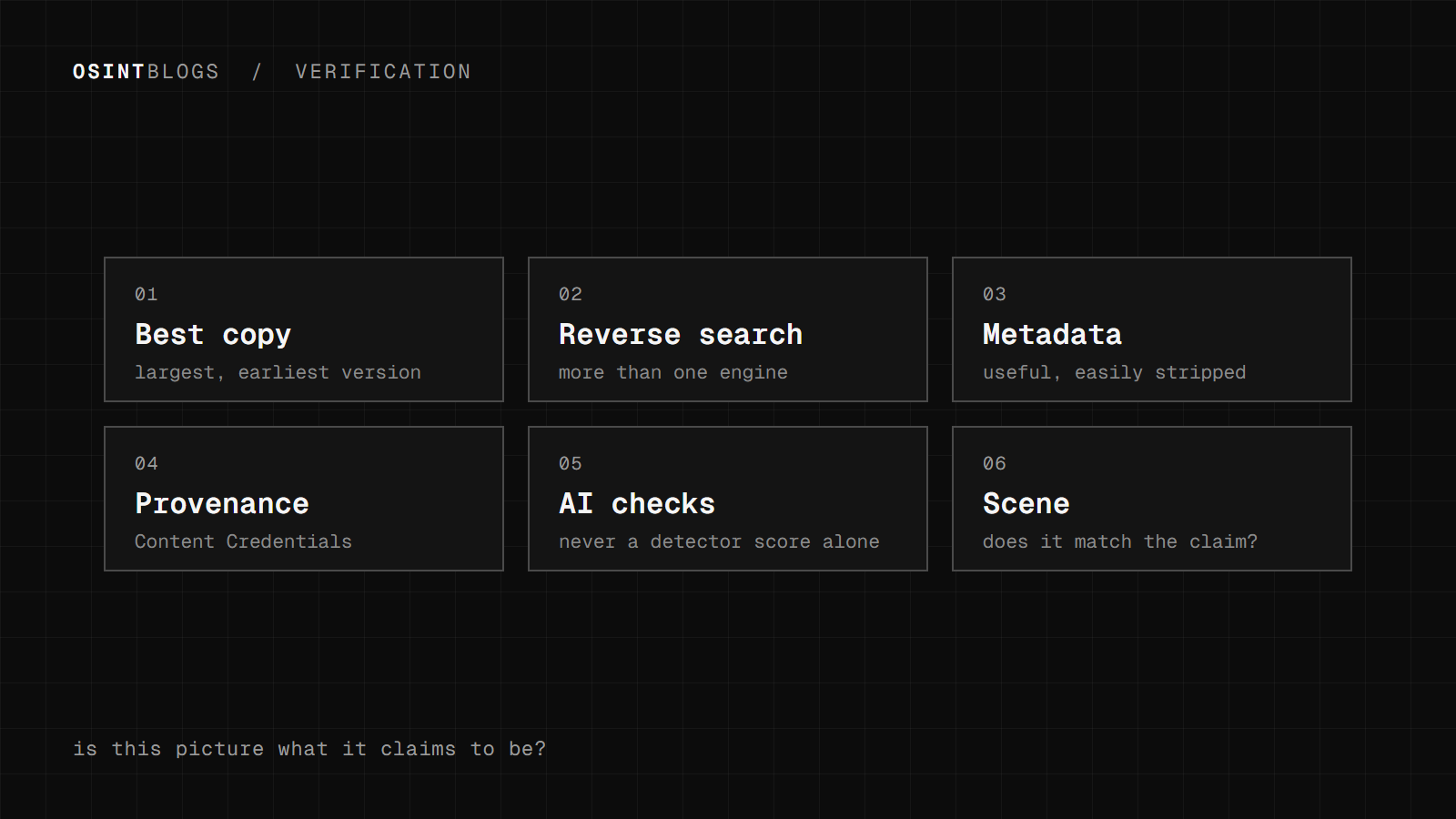
A six-step method for checking whether a picture is what it claims to be. Find the best copy, reverse search across four engines, read metadata and Content Credentials, test for AI generation without trusting detectors, and check the scene against the claim.

· 7 min read
There are three ways a picture can mislead. It can be real but old or from somewhere else. It can be real but edited. Or it can be generated. The first is still by far the most common, and it is the easiest to catch, which is why image verification starts with a search and not with a detector.
This guide sets out six steps in the order that resolves most cases fastest.
The questions you are answering
Question | Best evidence | Weak evidence |
|---|---|---|
Has this picture appeared before? | Reverse image search with dated results | Your own memory of it |
Who made it, and with what? | Content Credentials, original file metadata | Watermarks, captions |
Has it been altered? | An earlier, different version of the same picture | Error-level analysis on a compressed copy |
Was it generated? | Provenance records, physical impossibilities, a known source | AI detector scores |
Does it show what is claimed? | Landmarks, weather, shadows, other footage of the event | The caption |
Step 1: get the best copy
Every repost compresses and crops. Work back towards the earliest and largest version before analysing anything.
Open the image in its own tab and save the file itself. A screenshot is a new, smaller picture with none of the original's data.
Ask the person who sent it where they got it, and follow that chain.
If it came through a messaging app, ask for it to be sent as a file or document, which keeps the original data.
Record the address you found it at and the time, in UTC.
Step 2: reverse image search, on more than one engine
Each engine has a different index and a different idea of what "similar" means. A picture that draws a blank on one is often found by another.
Engine | Strongest at | Notes |
|---|---|---|
Google Lens | Landmarks, products, text in images, broad coverage | Favours visually similar results over exact copies. Use the exact-match option |
Bing Visual Search | Products, alternative crops, different sizes | Lets you select a region of the image |
Yandex Images | Faces, buildings and scenes from Eastern Europe and Central Asia | Often finds near-duplicates the others miss |
TinEye | Exact and edited copies of the same image | Sort by oldest to find first appearance. Has a compare view |
Practical points:
Crop to the informative part. Search a building, a sign or a mural on its own. Remove captions, borders and watermarks, which pull results towards other reposts.
Flip it. Mirrored copies are a cheap trick to defeat search. Flip the image horizontally and search again.
Sort by date where you can. If the picture existed online before the event it supposedly shows, the claim is false, and you can stop.
Read the oldest result. Look at the page it sits on, the date of that page and what the caption said then.
For video, extract still frames and search those. Our TikTok OSINT guide includes the commands.
Step 3: read the metadata, and know its limits
Cameras and phones write technical details into image files: device model, date and time, exposure settings, sometimes GPS position, and the software that last saved the file.
# Everything, grouped by type
exiftool -a -G1 -s photo.jpg

# The fields that matter most
exiftool -Make -Model -DateTimeOriginal -OffsetTimeOriginal -GPSPosition -Software photo.jpg
Three facts keep metadata in proportion:
Most platforms remove it. Facebook, Instagram, X, WhatsApp photos, TikTok and most others discard it on upload. A file from social media with no metadata is normal and proves nothing.
It can be edited. The same tool that reads metadata writes it. Metadata supports a conclusion. It does not make one.
Camera clocks are wrong. Times are whatever the device was set to. Check for a time zone offset field before converting.
Metadata is most useful on original files obtained from the photographer, on documents, and on files sent through channels that leave them unchanged.
Step 4: look for provenance records
Two technologies now attach origin information to images at creation.
Content Credentials, built on the C2PA standard, are signed records embedded in a file that state what made it and what edits followed. Some cameras, Adobe software and several AI image generators write them. You can inspect them with the verification site run by the Content Authenticity Initiative, or with the open-source c2patool:
c2patool photo.jpgInvisible watermarks, such as Google's SynthID, are embedded in the pixels by some generators and can be checked with the vendor's own detector.
Read both the same way:
A valid credential saying the image came from an AI generator is strong evidence that it was generated.
A valid credential from a camera is strong evidence of capture, as far as the signing chain can be trusted.
No credential and no watermark means nothing. Most images have neither. Screenshots and most platform uploads strip credentials, and many generators add none.
Step 5: test for AI generation without trusting a score
AI image detectors return a percentage. Treat that number with caution. Detectors are trained on output from particular generators, lose accuracy on new models, and are thrown off by compression, resizing and screenshots. They give confident wrong answers in both directions, and real photographs of real events have been dismissed as fake on the strength of them.
Use a detector as a prompt to look harder. Then look at things a generator has to invent:
Text. Shop signs, number plates, name badges, newspaper print. Generated text is better than it was, but small background text is still often nonsense.
Repeating structures. Fence posts, windows, piano keys, brickwork and stairs that drift, merge or change count.
Hands, ears, teeth and jewellery. Fewer errors than in early models, but earrings that do not match and glasses that melt into skin still occur.
Light. Shadows that point in different directions, reflections that do not match the scene, and a subject lit differently from the background.
The crowd. Background faces that are smeared or duplicated.
Too clean. Uniform, poreless skin and a glossy, evenly sharp finish.
Then ask the question that works regardless of how good generators become: where are the other pictures? A real public event is photographed by many people from many angles. A single dramatic image with no second angle, no video, no named photographer and no first poster with a history is suspect whatever it looks like.
Our guide to AI in OSINT covers where language and vision models help in this work and where they mislead.
Step 6: check the scene against the claim
A picture can be authentic and still be attached to a false story. Test the specifics.
Place. Match skyline, road layout, signs, shopfronts and street furniture against map and street-level imagery. Language on signs, number plate format, road markings and plug sockets narrow the country.
Time of day. Shadow direction and length give the sun's position. A tool such as SunCalc shows where the sun was at a given place, date and time.
Date. Compare the weather with historical records for the place. Look at foliage, snow, building work, adverts and shop names that changed.
Event. Compare with other footage and reporting from the same incident.
This step is what finally answers the question people actually ask, which is rarely "is this file authentic?" and usually "did this happen there, then?".
Error-level analysis
Tools such as Forensically and FotoForensics show error-level analysis, noise patterns and clone detection. They can highlight a pasted region in an image that has been saved only once or twice. On a picture that has been through several rounds of social media compression, they mostly highlight edges and text, and inexperienced users read tampering into ordinary artefacts. Use them on high-quality files, compare against an untouched photo from the same source, and do not rest a conclusion on them alone.
How to word the result
Say what you found and how sure you are. Useful forms:
"The image was online by 14 March 2021, so it does not show an event from this week."
"No earlier copies were found on four search engines on a stated date. This does not establish that the image is new."
"The file carries a valid Content Credential identifying an AI generator."
"The scene matches a named street, and shadows are consistent with mid-afternoon. The date could not be confirmed."
Avoid "the image is real". Verification establishes specific facts about origin, date and place.
Keep the file, its hash and your search results. Our guide to preserving web evidence explains how.
Frequently asked questions
What is the best reverse image search engine?
There is no single best one. Google Lens has the broadest coverage, TinEye is best for finding the oldest exact copy, and Yandex often finds matches the others miss. Use at least three.
Can I tell where a photo was taken from its metadata?
Only if the file still contains GPS data, which is rare for anything downloaded from social media. Otherwise, location comes from what is visible in the picture.
Are AI image detectors accurate?
Not enough to rely on. They work best on unedited output from generators they were trained on and worst on compressed, cropped or screenshotted images. Treat a score as a hint.
How can I tell if an image has been edited?
The strongest proof is an earlier version of the same picture that differs. Provenance records and forensic filters can support the case. Many edits leave no detectable trace.
Does a missing watermark mean an image is not AI-generated?
No. Many generators add no watermark, and cropping, screenshots and re-encoding can remove the ones that exist.