GitHub OSINT: what commits, keys and profiles reveal
How to research a GitHub user or organisation with open sources. Read profile data through the API, recover author emails and time zones from commits, link accounts through SSH keys, check stars and forks for manipulation, and know which signals can be forged.

· 6 min read
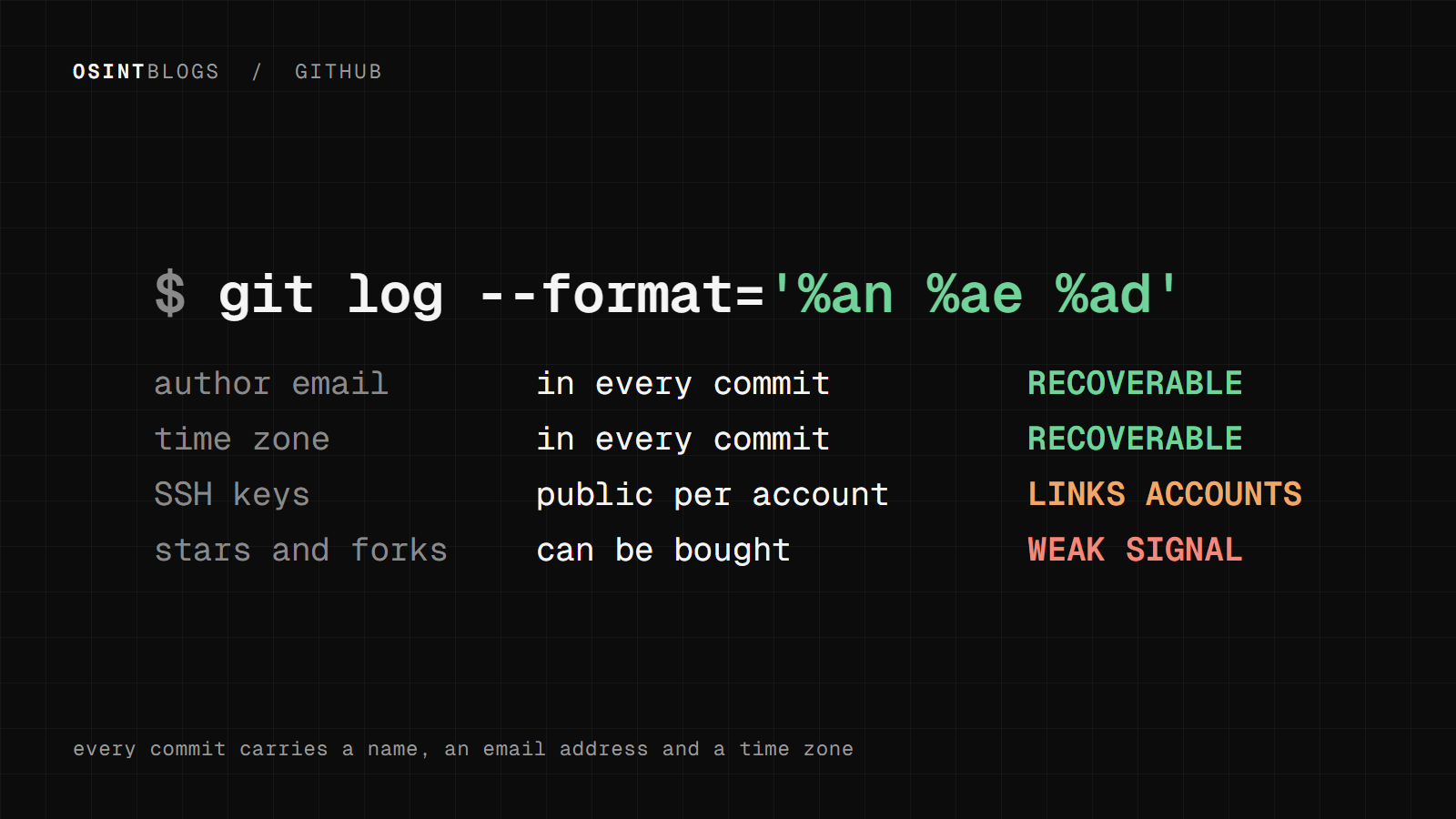
GitHub is a social network whose users publish unusually precise records about themselves. Every commit stores a name, an email address, a timestamp and a time zone offset. Profiles expose creation dates and public keys. Almost all of it is available through a free API.
It is also a platform where much of that information is typed in by the user and never checked. This guide covers what to collect and how much weight each item can bear.
Start with the profile API
The API returns more than the profile page shows, and needs no login for light use.
curl -s https://api.github.com/users/octocat | jq '{login, id, name, company, blog, location, email, bio, created_at, updated_at, public_repos, followers}'octocat is GitHub's own demonstration account. Replace it with the username you are researching.
idis the permanent account number. Usernames can be changed, and a released username can be registered by someone else, so record the ID.https://api.github.com/user/583231resolves an ID back to the current username.created_atis set by GitHub and cannot be edited.name,company,location,blogandemailare typed in by the user. They are claims.
Unauthenticated requests are limited to 60 an hour per IP address. A free personal token raises that to 5,000.
Commits: name, email, time and time zone
A Git commit records an author and a committer, each with a name, an email address and a timestamp that includes the offset from UTC. GitHub's web pages hide the email. The underlying data does not.
Add .patch to any commit link to see the raw header:
https://github.com/OWNER/REPO/commit/COMMIT_HASH.patchFor a whole repository, clone it and summarise:
git clone --bare https://github.com/OWNER/REPO.git
cd REPO.git

# Every author identity used in the history
git log --all --format='%an <%ae>' | sort | uniq -c | sort -rn

# Time zone offsets used by one author
git log --all --author='name or email' --format='%ad' --date=format:'%z' | sort | uniq -c

# Hours of the day that author commits, in their own recorded local time
git log --all --author='name or email' --format='%ad' --date=format:'%H' | sort | uniq -c
What this produces:
Email addresses. Often a personal or work address used before the author learned to hide it. Early commits in old repositories are the most revealing. These lead into email OSINT.
Several identities for one person. The same person committing as a full name from a work address and a nickname from a personal one.
Time zone and working hours. An offset of
+0530across two years of commits, clustered between 10:00 and 19:00, is a meaningful pattern.
The noreply address
Users who enable email privacy commit as 12345678+username@users.noreply.github.com. The number is the account ID. That is useful in its own right: the ID stays the same when the username changes, so an old commit tells you which present-day account made it.
How far to trust commit data
Treat commit metadata as strong when it is consistent across a long history that predates any reason to fake it, and weak when it is a handful of commits in a new repository. A "Verified" badge means the commit was signed with a key registered to that account, which is much harder to fake.
Public keys link accounts
GitHub publishes every user's SSH and GPG public keys:
https://github.com/USERNAME.keys
https://github.com/USERNAME.gpg
People copy the same key pair to new machines and new accounts for years. If two accounts list the same SSH public key, the same person, or people sharing a machine, control both. GPG keys also contain the name and email address the owner entered when creating the key. Other code hosting sites publish keys in a similar way, which allows matching across platforms.
Among GitHub signals, a shared key is one of the hardest to explain away.
Activity, organisations and relationships
# Recent public activity
curl -s https://api.github.com/users/USERNAME/events/public | jq '.[] | {type, repo: .repo.name, created_at}'

# Organisations the user shows publicly
curl -s https://api.github.com/users/USERNAME/orgs | jq '.[].login'

# Public members of an organisation
curl -s https://api.github.com/orgs/ORGNAME/members | jq '.[].login'
The events feed covers roughly the last 90 days and lists pushes, issues, comments, stars and forks with exact times in UTC. Unlike commit dates, these times are recorded by GitHub and cannot be set by the user.
Organisation membership is hidden by default, so the public list is a minimum. To find the rest, look at who commits to the organisation's repositories, who reviews pull requests and who is assigned issues.
Also read:
Issues and pull request comments. Free text, in the person's own voice, often mentioning employers, clients and projects.
Starred repositories and followed accounts. Interests, tools and colleagues.
Gists. Small snippets that people forget are public.
The profile README. A repository named after the user, often with links to other platforms.
For matching the username on other sites, see username OSINT.
Stars, forks and fake popularity
Star counts are used to make malicious or low-quality repositories look established, and stars are sold in bulk. The API returns when each star was given:
curl -s -H "Accept: application/vnd.github.star+json" "https://api.github.com/repos/OWNER/REPO/stargazers?per_page=100" | jq '.[] | {user: .user.login, starred_at}'Signs of manipulation:
hundreds of stars arriving within hours, on a repository with no release or publicity to explain it
stargazer accounts created in the same few days, with no repositories and no followers
the same group of accounts starring a set of unrelated repositories
many stars but almost no issues, forks or outside contributors
Forks deserve the same scepticism. A fork of a respected project keeps the original's history and contributors on display, with the fork owner's changes on top. Check which commits are new in the fork before treating the visible contributors as involved.
Recovering what was deleted
GH Archive has recorded GitHub's public event stream since 2011 and is queryable as a public data set. It shows repositories that have since been deleted or made private, and activity by renamed accounts.
The Wayback Machine holds copies of many profile and repository pages.
Forks keep history. A commit deleted from the original repository may survive in any fork made before the deletion.
Package registries. Packages published from a repository to npm or PyPI carry maintainer names and addresses of their own.
Secrets in code
Searching GitHub for a company's domain alongside words such as password, token or api_key finds real credentials with depressing regularity. Code search needs a logged-in account.
Finding an exposed credential is open-source research. Using it is unauthorised access, which is a crime in most countries whatever your intentions. If you find one, record where it is, do not test it, and report it to the owner. Our overview of whether OSINT is legal covers where that line sits.
A workflow
Record the username and account ID, and the
created_atdate.Save the profile JSON and the public keys.
Clone the repositories that matter and list author identities, offsets and commit hours.
Compare user-set commit dates with GitHub-recorded event times.
Search for the same keys, emails and usernames elsewhere.
Check stars and forks before relying on popularity.
Grade each finding: recorded by GitHub, cryptographically tied to the account, or typed in by the user.
Frequently asked questions
Can I find someone's email address from their GitHub account?
Often. Commit headers contain the author's email unless they enabled email privacy. Add .patch to a commit link or run git log on a clone.
Can GitHub commit dates be faked?
Yes. Author and committer dates are set by the person committing. Times in the events feed, and dates on issues, comments and stars, are recorded by GitHub and are reliable.
How do I see when a GitHub account was created?
Request https://api.github.com/users/USERNAME and read created_at.
Does GitHub tell users who viewed their profile or cloned their repository?
No. Repository owners see total visit and clone counts for the last 14 days, not who was responsible. Starring, following and forking are visible, so avoid them from a research account.
Is it legal to collect data from GitHub?
Reading public data through the API within its rate limits is what the API is for. GitHub's terms restrict using the data for spam or selling personal information, and data protection law applies to the personal data you keep.